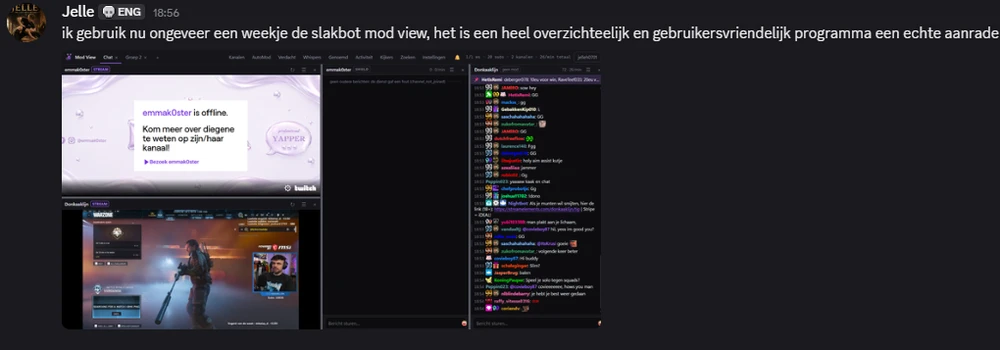
Mod View is a Windows program in which you put the chats of your channels side by side and moderate from there. Chatting and moderating is something any client can do. The point is what sits next to the chat: the viewer card.
The app is free for moderators. It exists to show what SlakBot keeps track of in a channel, not to earn anything from it.
What a chat client cannot keep track of, because it wasn't there.
A chat connection starts at the moment you open it. Mod View puts a stretch of chat from just before that moment at the top, but that is the last stretch of chat, not months of it. Anyone who says nothing while you are watching, and anything someone did last month, is not in there.
SlakBot sits there the whole time. If the bot runs in the channel, every name comes with what the bot has recorded. That is exactly what you need for the question you have to answer at the moment you step in: is this a regular who slipped up, or someone who just walked in to stir things up?
| From Twitch | What it says |
|---|---|
| Account since | The date the account was created, and how long ago that was. |
| Follows | Since when this viewer has followed the channel, or "no". |
| Status | Not banned, timed out until a given moment, or permanently banned — with who did it and the reason. Only in your own channel: Twitch hands the ban list to the streamer alone, so in someone else's channel this row stays on "unknown", with that reason next to it. |
| From SlakBot | What it says |
|---|---|
| Messages | How much this viewer has chatted in this channel. |
| Watched | The estimated watch time, if the channel keeps track of it. |
| Coming here since | The first time SlakBot saw this viewer here. |
| Last seen | Date and time of the most recent visit. |
| Moderation (90 days) | Time-outs, bans and deleted messages, with how many of them came from a human and how many from the bot. |
If SlakBot doesn't know something, the card says why it isn't there — not a 0 that you read as "this person has never done anything here".
SlakBot counts per block who was in the chat, not the actual watch time. So the card writes "≈ 87 hours" and not "87 hours". If the channel doesn't track watch time, it says "not tracked here".
The mod log is cleared after 90 days. So it says "no moderation action in the last 90 days" — a clean slate from last year is not proof.
Everything is limited to the channel you're looking at: a moderator of channel A does not get to see how someone behaved in channel B. Coins, XP and leaderboard position are not on the card — the economy is not a moderation signal.
From the card you hand out a time-out (10 minutes, 30 minutes, 1 hour or 24 hours), warn someone, delete a message, ban them or send a whisper. Every button is one click, ban included: a threshold you click away dozens of times per stream stops being a threshold. The safety net is the undo strip — for ten seconds there is a button that really reverses the time-out or the ban. If nobody clicks within those ten seconds, the ban stands. Deleting a message has no undo, and the card says so. Only Shield Mode still asks for a second click, because that one locks the chat for everyone at once.
Columns next to each other, panels stacked within a column, and tab groups along the top. After a restart the layout comes back the way you left it.
When you open a channel, a stretch of chat from before that moment appears at the top. Twitch doesn't supply that itself; it comes from recent-messages.robotty.de, an outside service, so the name of the channel goes there. Can be switched off.
The Twitch player as a panel next to the chats, muted when it opens. What that costs in memory is further down, unvarnished.
Drag a panel by its header to the edge of another panel. Pull the divider between two columns to make them wider or narrower; a double-click divides them evenly again.
Measured across 1,656 messages: EventSub arrived later than IRC in all 1,656 cases — median 53 ms, p10 39, p90 83. So messages come in over IRC. Moderation events stay on EventSub — those don't exist in structured form on IRC.
Several accounts in the same encrypted vault, one active. Per account you can see whether it still has all the permissions, so you don't switch to an account where half the app doesn't work.
Time-out, undo, delete message and ban, in the chat line itself. All four are one click. After a time-out and after a ban an undo button stands there for ten seconds; a deleted message does not come back, and the app says so.
In the settings you decide yourself which buttons are there and in what order. Several time-outs each with their own duration is allowed.
A single queue across all open channels, with the part AutoMod found suspicious marked — so you can see why something is held. If a colleague decides first, the line disappears by itself.
Who Twitch flags as a ban evader or banned elsewhere. That judgement is Twitch's and not ours, and the card says so.
The status per channel in the panel header, to switch on and off. If a colleague turns it on, you see it happen.
Who is in the chat right now, per channel and searchable, in groups: streamer, moderators, VIPs and viewers, with counts. The roles are read off the badges of whoever has said something, and the list is a snapshot with the time it was fetched next to it — not a live list.
7TV, BetterTTV, FrankerFaceZ and Twitch, animated emotes and 7TV overlays included. If a streamer adds one mid-stream, it's there straight away.
Twitch, 7TV and FrankerFaceZ. If FFZ says a badge replaces a Twitch badge, that is respected — otherwise both are shown.
Gradients and all. Not decoration: the colour tells you faster than the name itself that someone is a regular.
A side panel with everything your name or an alert word appears in, across all open channels at once.
Subscriptions, gifts, raids, announcements — and what other moderators did, even when none of it shows up in the chat.
Your own words that light up and beep just like your own name does. The bell in the top bar mutes the sound.
Receiving and replying. Sending requires a verified phone number on your Twitch account; the panel tells you that before you type a reply that will never arrive.
Through everything the app saw this session. No further: there are no chat logs on your disk, and there is nothing to dig back through later.
"ik gebruik nu ongeveer een weekje de slakbot mod view, het is een heel overzichteelijk en gebruikersvriendelijk programma een echte aanrader!"
Original message in Dutch — translation: "I've been using the SlakBot Mod View for about a week now, it's a really clear and user-friendly program, definitely recommended!"
Things you'd rather read before installing than after.
Every menu, button and label in the app is Dutch. There is no English version of the interface. This page is written in English so you can decide before you ask for access, not after you've installed it.
There are no builds for macOS and Linux, and there won't be. That is a choice, not a backlog item.
Measured: the first stream panel costs hundreds of megabytes — a good 700 MB, between +625 and +720 across runs. Every one after that costs tens of megabytes up to a bit over a hundred, and that differs per stream. It comes on top of OBS and a game. One extra stream is a reasonable choice, four is not on most machines. The app imposes no limit on you — it just doesn't hide the bill.
Numbers only appear once (1) Mod View is switched on for the channel and (2) you link the app once. That first switch is off by default and only a Discord admin of the server can set it — it's the streamer's audience, so it isn't a moderator's call. And the state of it today: that switch isn't in the SlakBot panel yet, while that is the case it can only be switched on by hand, per server — ask about it in the Discord. If either one is missing, the card says so in as many words instead of showing zeros.
Through Device Code Flow: a Twitch page opens with the code already filled in, you confirm, done. After that the app remembers it. The token is stored encrypted on your own disk.
Twitch gets your token and what you're looking at; without that there is no app. Two others get something as well, both with their own switch in the settings. The chat from before you opened a channel comes from recent-messages.robotty.de, an outside service, and the name of that channel goes there — so which channels you open, and when, is known to a server that is neither Twitch's nor ours. And 7TV gets the Twitch ID of every chatter the app doesn't know yet, because otherwise there are no badges and no name colours. FrankerFaceZ gets nothing about viewers, BetterTTV only channel IDs.
You can open any Twitch channel to read and chat. Twitch refuses moderation there, so those buttons aren't shown — with the label "not a mod" in the panel header, so you know why.
A small group of moderators is running Mod View right now, on version 0.10.0. There is no public download on this site yet; that will come. If you'd like to join earlier, ask for access in the Discord — you'll hear straight away what's expected: use the app and say what isn't right.
Mod View costs moderators nothing. If SlakBot isn't running in the channel the app still works — you only miss the card, and the app tells you so. Do keep in mind that the interface is Dutch.